
 ### **Granularity Method**
You can aggregate cost data in three different ways, depending on the granularity you need for your analysis:
* **Daily**
* **Weekly**
* **Monthly**
### **Granularity Method**
You can aggregate cost data in three different ways, depending on the granularity you need for your analysis:
* **Daily**
* **Weekly**
* **Monthly**
 ### **Cost Representation Type**
You can choose the most relevant Cost Representation Type to gain the insights you need:
* **Unblended Cost** – Shows the raw usage cost at standard rates, before credits or account-level discounts.
* **Net Unblended Cost** – Reflects the actual billed amount after applying credits and discounts to unblended costs.
* **Blended Cost** – Distributes shared resource costs across linked accounts, offering an averaged view under consolidated billing.
* **Amortized Cost** – Spreads upfront Reserved Instance or Savings Plan fees evenly across the commitment period for long-term visibility.
* **Net Amortized Cost** – Combines amortized costs with credits and discounts to reveal your true, all-in long-term spending.
### **Cost Representation Type**
You can choose the most relevant Cost Representation Type to gain the insights you need:
* **Unblended Cost** – Shows the raw usage cost at standard rates, before credits or account-level discounts.
* **Net Unblended Cost** – Reflects the actual billed amount after applying credits and discounts to unblended costs.
* **Blended Cost** – Distributes shared resource costs across linked accounts, offering an averaged view under consolidated billing.
* **Amortized Cost** – Spreads upfront Reserved Instance or Savings Plan fees evenly across the commitment period for long-term visibility.
* **Net Amortized Cost** – Combines amortized costs with credits and discounts to reveal your true, all-in long-term spending.
 ### Grouping Costs
To help structure and analyze your cloud expenditure, you can group your cost data by various dimensions.
### Grouping Costs
To help structure and analyze your cloud expenditure, you can group your cost data by various dimensions.
| Cloud | Group By Option | Description |
|---|---|---|
| AWS | Account | AWS account. |
| AWS | API Operation | Specific API operations performed. |
| AWS | Availability Zone | AWS Availability Zone where resources are deployed. |
| AWS | Billing Entity | Billing entity associated with the usage. |
| AWS | Charge Type | Charge classification such as usage, recurring, or one-time fees. |
| AWS | Cost Center | Assigned cost center. |
| AWS | Cost Center Category | Defined cost center categories. |
| AWS | Database Engine | Database engine type (e.g., MySQL, PostgreSQL). |
| AWS | Instance Type | EC2 or database instance type. |
| AWS | Legal Entity | Legal entity associated with the account. |
| AWS | Platform | Operating system or platform type. |
| AWS | Purchase Option | Reserved, on-demand, or other purchase options. |
| AWS | Region | AWS region. |
| AWS | Resource | Individual resource identifiers. |
| AWS | Service | AWS service. |
| All clouds | Tag | User-defined tags. |
| AWS | Tenancy | Resource tenancy (shared or dedicated). |
| AWS | Usage Type | AWS usage type classification. |
| All clouds | Virtual Tag | Virtual tags created in OneLens for additional categorization. |
| Azure | Benefit Name | Applied reservation or savings plan name. |
| Azure | Charge Type | Cost record type classification (usage, purchase, refund) |
| Azure | Frequency | Billing recurrence indicator |
| Azure | Meter | Unique billing meter identifier |
| Azure | Meter Category | Top-level Azure service classification |
| Azure | Meter Subcategory | Azure service feature or tier breakdown |
| Azure | Partner Name | CSP or reseller partner identifier |
| Azure | Pricing Model | Billing arrangement type (on-demand, reservation, spot) |
| Azure | Product | Purchased Azure product or SKU name |
| Azure | Product Order Name | Enrollment or order grouping label |
| Azure | Provider | Infrastructure provider type |
| Azure | Publisher Name | Marketplace or service publisher identity |
| Azure | Publisher Type | Publisher origin classification (Microsoft, third-party) |
| Azure | Resource Group Name | Azure resource group container name |
| Azure | Resource Location | Deployed Azure region or datacenter |
| Azure | Resource Type | Azure ARM resource type identifier |
| Azure | Service Family | High-level Azure service grouping (Compute, Storage, Networking) |
| Azure | Subscription | Azure billing subscription scope |
| GCP | Cost Type | Charge classification (regular, tax, credit, adjustment) |
| GCP | Country | Billing or usage geographic country |
| GCP | Folders | GCP resource hierarchy folder path |
| GCP | Labels | User-defined key-value resource tags |
| GCP | Location | GCP multi-region or location grouping |
| GCP | Organization | GCP organization-level billing entity |
| GCP | Project | GCP project scope for cost attribution |
| GCP | Region | GCP compute region identifier |
| GCP | Resource Global Name | Fully-qualified GCP resource URI |
| GCP | Resource Name | Short display name of provisioned resource |
| GCP | Seller | Cost origin classification (Google, third-party reseller) |
| GCP | Service | GCP product service name (Compute Engine, BigQuery, etc.) |
| GCP | SKU | Granular billable unit or pricing item identifier |
| GCP | System Labels | Google-managed automatic metadata labels |
| GCP | Zone | GCP availability zone within a region |
| OCI | Availability Domain | OCI datacenter within a region |
| OCI | Compartment ID | Unique identifier for OCI resource compartment |
| OCI | Compartment Name | Logical resource grouping container name |
| OCI | Product Description | OCI service or feature display name |
| OCI | Product SKU | Billable product pricing unit identifier |
| OCI | Region | OCI deployed datacenter region |
| OCI | Resource ID | Unique OCID of the provisioned resource |
| OCI | Service | Top-level OCI service classification (Compute, Object Storage, etc.) |
| OCI | Subscription | OCI billing subscription or contract scope |
| OCI | Tenant ID | OCI tenancy-level billing entity identifier |
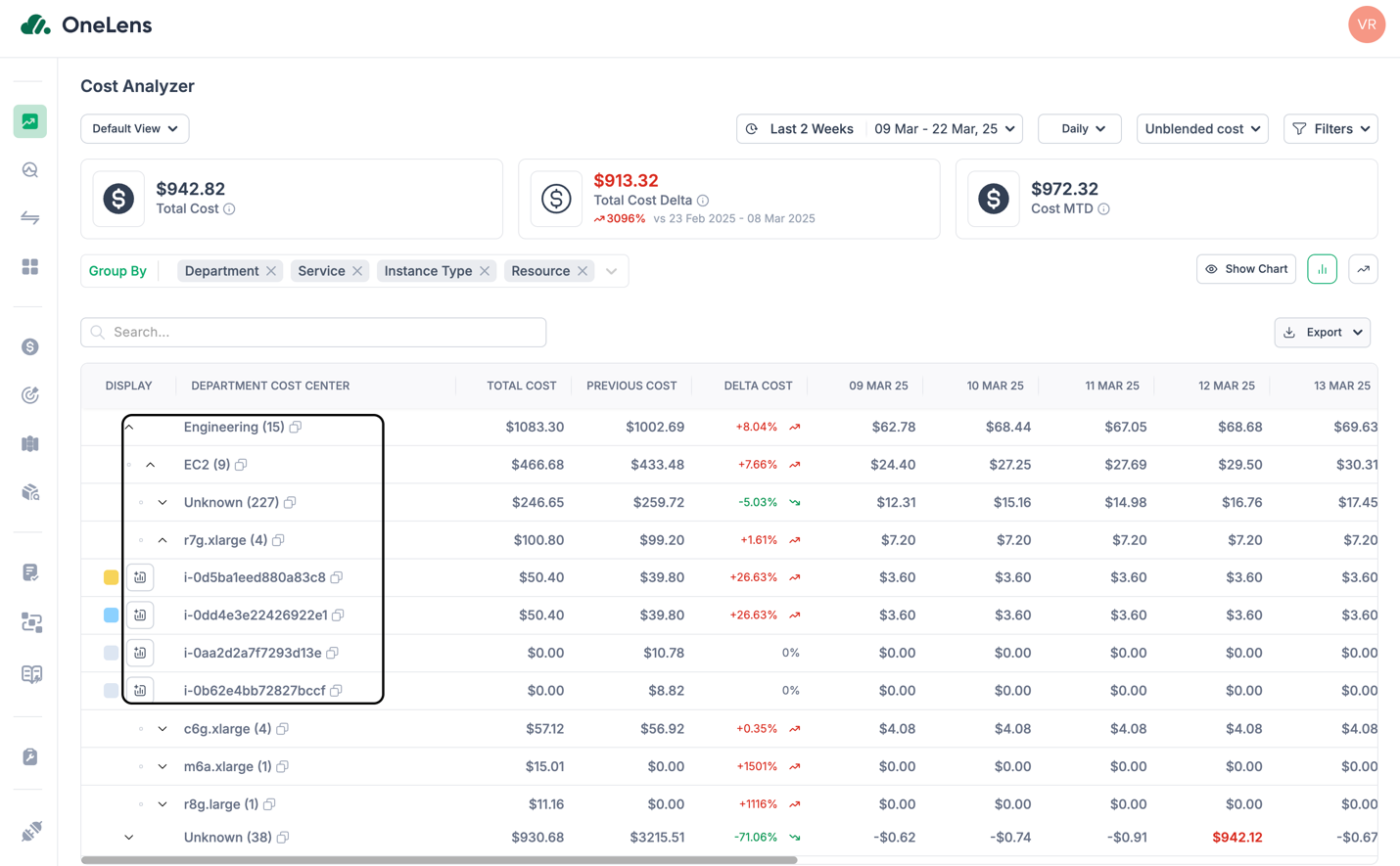 {% endhint %}
### Filters
Filters help refine cost reports by focusing on specific data points.
Here is how you apply filters:
1. Navigate to the Filters section in the Cost Atlas.
2. Select multiple conditions to filter data using an AND condition.
3. Add rules by selecting:
1. **Field**: Choose a cost attribute (e.g., Service, Account, Usage Type, Cost Center).
2. **Operator**: Available operators for setting filter conditions include **In** or **Not In**.
3. **Value**: Enter the specific data point to filter (e.g., EC2, us-east-1, >$1000).
4. Click Apply to filter cost data and focus on relevant insights.
{% hint style="info" %}
## Use Case
A cloud engineer wants to analyze storage costs for a specific cloud region and service to track data transfer expenses more effectively.
**Solution:** The engineer applies the following filters:
* **Service:** Amazon S3 or Storage Accounts
* **Region:** us-east-1 or US East 2
{% endhint %}
The Cost Atlas then displays cost data specifically for Storage Accounts in the US East 2 region, helping the engineer track and investigate any rising data transfer costs.

#### Next: Save Your Cost Report View
Once the report is configured with the required time range, filters, grouping, and cost type, you can preserve the setup by saving it as a view.\
Learn [how to save your cost report view](/observe-visibility-and-insights/cost-reporting/cost-atlas/saved-views.md#how-to-save-a-view)
---
# Agent Instructions
This documentation is published with GitBook. GitBook is the documentation platform designed so that both humans and AI agents can read, navigate, and reason over technical content effectively. Learn more at gitbook.com.
## Querying This Documentation
If you need additional information that is not directly available in this page, you can query the documentation by asking a question.
Perform an HTTP GET request on the following URL with the `ask` and `goal` query parameters:
```
GET https://docs.onelens.cloud/observe-visibility-and-insights/cost-reporting/cost-atlas/configuring-a-cost-report.md?ask=
{% endhint %}
### Filters
Filters help refine cost reports by focusing on specific data points.
Here is how you apply filters:
1. Navigate to the Filters section in the Cost Atlas.
2. Select multiple conditions to filter data using an AND condition.
3. Add rules by selecting:
1. **Field**: Choose a cost attribute (e.g., Service, Account, Usage Type, Cost Center).
2. **Operator**: Available operators for setting filter conditions include **In** or **Not In**.
3. **Value**: Enter the specific data point to filter (e.g., EC2, us-east-1, >$1000).
4. Click Apply to filter cost data and focus on relevant insights.
{% hint style="info" %}
## Use Case
A cloud engineer wants to analyze storage costs for a specific cloud region and service to track data transfer expenses more effectively.
**Solution:** The engineer applies the following filters:
* **Service:** Amazon S3 or Storage Accounts
* **Region:** us-east-1 or US East 2
{% endhint %}
The Cost Atlas then displays cost data specifically for Storage Accounts in the US East 2 region, helping the engineer track and investigate any rising data transfer costs.

#### Next: Save Your Cost Report View
Once the report is configured with the required time range, filters, grouping, and cost type, you can preserve the setup by saving it as a view.\
Learn [how to save your cost report view](/observe-visibility-and-insights/cost-reporting/cost-atlas/saved-views.md#how-to-save-a-view)
---
# Agent Instructions
This documentation is published with GitBook. GitBook is the documentation platform designed so that both humans and AI agents can read, navigate, and reason over technical content effectively. Learn more at gitbook.com.
## Querying This Documentation
If you need additional information that is not directly available in this page, you can query the documentation by asking a question.
Perform an HTTP GET request on the following URL with the `ask` and `goal` query parameters:
```
GET https://docs.onelens.cloud/observe-visibility-and-insights/cost-reporting/cost-atlas/configuring-a-cost-report.md?ask=